The LLM writes the course. The toolkit signs the contract.
The creative layer is free-form HTML — whatever your AI assistant dreams up. OELTKit provides everything around it: the manifest that declares what the course is, the runtime that talks to your LMS, the components that make interactions accessible, and the packager that ships it. The LLM never has to get the plumbing right, because the plumbing isn't its job.
-
Your content
Free-form HTML and media, written by your AI assistant. The bespoke part stays bespoke.
-
Components & runtime
Accessible interaction components and one tracking API that speaks every LMS dialect.
-
Validation
Accessibility, tracking, and packaging checks — findings the AI can read and fix itself.
-
Package
A SCORM 1.2, SCORM 2004, or cmi5 zip that imports into the LMS you already have.
The real artifacts, start to finish
This walkthrough shows the actual files at each step — the manifest, a content page, the validator's output (including a caught error), and the package landing in an LMS.
Everything below is the real walkthrough course shipped in the toolkit
(oeltkit/oeltkit): a genuine
course.json, a real content page, the actual oelt validate
output, and a screenshot of it running in the local LMS harness. The one remaining
placeholder is a real-LMS import screenshot — captured from a SCORM Cloud run, not mocked
up.
1 · The manifest: course.json
One declarative file: title, structure, completion rule, and score source. Declared, not hand-wired — the runtime enforces it on every target. This course completes when its one required interaction passes, and scores from that same question with a mastery of 80%.
{
  "oelt": "0.1",
  "id": "org.oeltkit.walkthrough",
  "title": "Spotting Phishing Emails",
  "lang": "en",
  "targets": [
    "scorm12",
    "cmi5",
    "web"
  ],
  "tracking": {
    "completion": {
      "rule": "required-interactions-passed"
    },
    "score": {
      "rule": "single-interaction",
      "source": "q1",
      "mastery": 0.8
    }
  },
  "structure": [
    {
      "id": "m1",
      "title": "Spotting Phishing Emails",
      "pages": [
        {
          "id": "intro",
          "title": "Why phishing works",
          "src": "pages/intro.html"
        },
        {
          "id": "check",
          "title": "Knowledge check",
          "src": "pages/check.html",
          "interactions": [
            {
              "id": "q1",
              "type": "choice",
              "weight": 1,
              "required": true
            }
          ]
        }
      ]
    }
  ]
}
2 · A content page with a real interaction
Plain HTML the LLM wrote, with an <oelt-mcq> where the knowledge check
goes. Its id (q1) matches the interaction declared in the
manifest — that's the whole wiring. No build step, no framework.
<section>
  <h1>Knowledge check</h1>
  <oelt-mcq id="q1" mode="single" key="b">
    <p slot="prompt">
      An email says your mailbox is full and links to "re-validate" your password. What is the
      safest first step?
    </p>
    <oelt-option value="a">Click the link and sign in to free up space.</oelt-option>
    <oelt-option value="b"
      >Go to the service directly in your browser, not via the email link.</oelt-option
    >
    <oelt-option value="c">Reply to ask whether the email is genuine.</oelt-option>
    <p slot="correct">Correct — navigate to the service yourself so a fake link can't catch you.</p>
    <p slot="incorrect">
      Not quite — never trust the email's own link; open the service directly in your browser.
    </p>
  </oelt-mcq>
</section>
3 · Validation — including the part where it catches a mistake
oelt validate checks the schema, id uniqueness, that declared interactions
exist in the HTML, media accessibility, and tracking reachability. On the course above it
reports { "ok": true, "findings": [] }. Introduce a mistake — declare an
interaction q2 that no element provides — and it catches it:
{
  "ok": false,
  "findings": [
    {
      "level": "error",
      "code": "interaction-missing",
      "message": "declared interaction \"q2\" has no element with that id in pages/check.html",
      "message_human": "Page \"Knowledge check\" declares an interaction \"q2\" but no element with that id was found in pages/check.html — add id=\"q2\" to the element.",
      "where": "check"
    }
  ]
}
Every finding carries a message_human sentence that names the page by
title — so an AI assistant can read it and fix its own output, then re-validate. Honesty
matters here: it will catch things, and that's the point.
4 · Running it — the tracking, live
oelt preview serves the course in a local fake-LMS harness with a live
tracking inspector. Here's the knowledge check answered correctly: the inspector shows
the course reporting completed / passed with a score of
100 — the same SCORM 1.2 calls a real LMS receives.
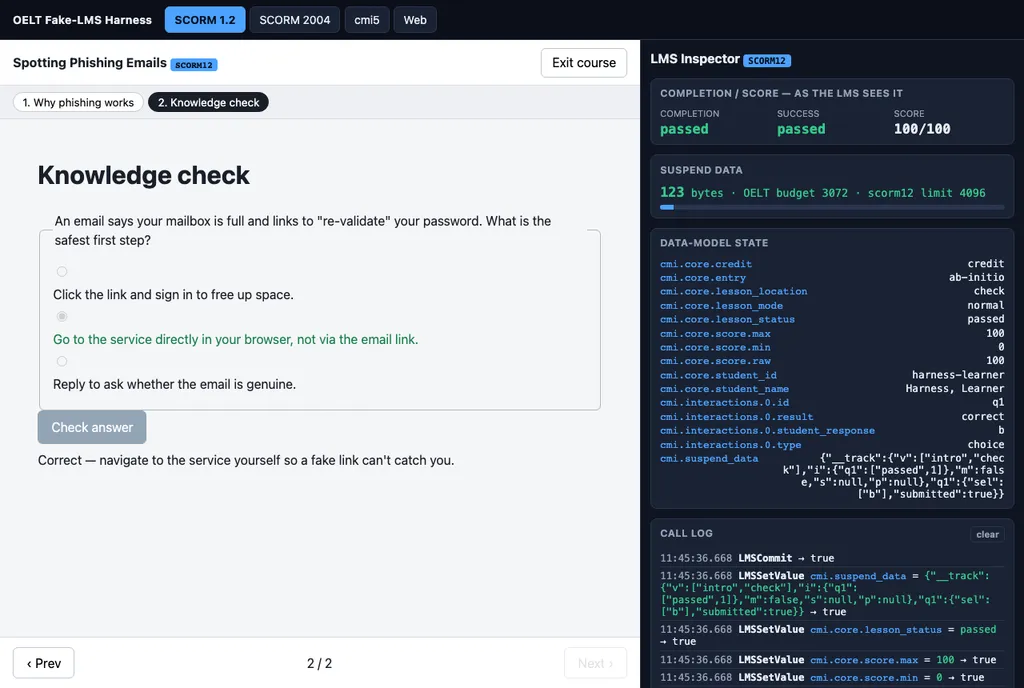
completed / passed / score 100.
Coming: a screenshot of the same packaged course imported and completing in a real LMS (SCORM Cloud). That needs an authenticated LMS session a local run can't produce, so it lands here after the conformance run — we don't mock one up.
Want the long version?
- Architecture docs — the full layer model behind the 4-box picture above.
- Runtime & tracking API — how
oelt.trackmaps to SCORM 1.2, SCORM 2004, and cmi5. - MCP server & tool list — connect OELTKit to Claude Desktop, Claude Code, or any stdio MCP host.
- Authoring guide — the manifest shape and how the content layer, components, and tracking fit together.